This VM is a LEMP Web Server with phpMyAdmin installed on Rocky Linux 9.
This VM supports following versions.
- PHP 8.3
- Nginx 1.20
- MariaDB 10.5
- phpMyAdmin 5.2
Security considerations
- Host firewall: Disabled. External access is restricted by Google Cloud firewall rules (http-server, https-server).
- SELinux: Permissive to avoid blocking Nginx/PHP modules.
Web Server
We prepared SSL/TLS so you can access to top page using http:// or https://.
DB Server Password
You can find the password from Compute Engine console Log.
- Go to the Compute Engine console -> VM instances
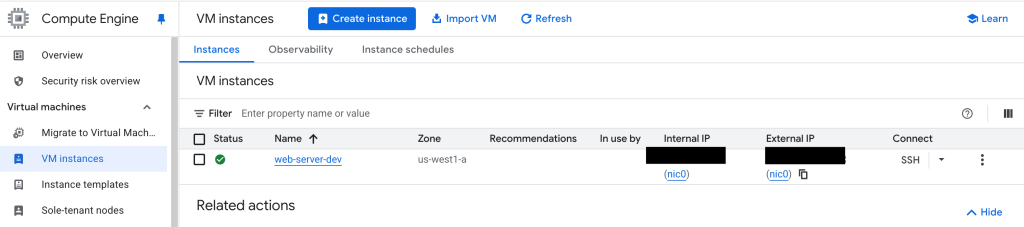
- Select your VM Instance -> Select Serial port 1 (console)
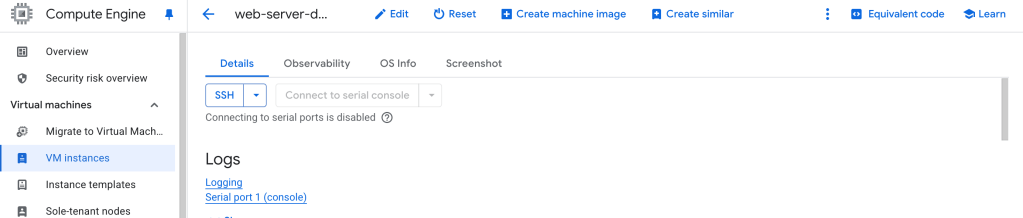
Serial port 1 (console) log

You can also SSH into your instance and find the login credential using the following command.
$ cat /home/rocky/credentials
////////////////////credentials info////////////////////
--- phpMyAdmin
----- Setting  : Success
--- MariaDB
----- User     : root
----- Password : 0nj4lirGtrtqTrxa
////////////////////////////////////////////////////////
phpMyAdmin
You can access to phpMyAdmin after creating ssh tunnel.
How to Set up SSH Tunneling (Port Forwarding)
ex.) create ssh tunnel
$ gcloud compute ssh --zone "us-west1-a" rocky@vm-instance-name --project "projectname" -- -N -L 8080:localhost:80http://localhost:8080/phpMyAdmin/
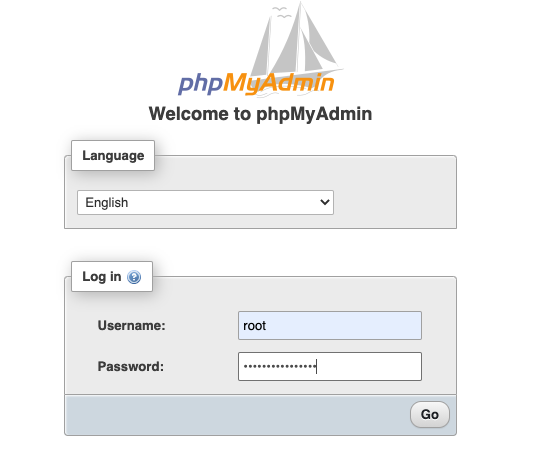
For phpMyAdmin please refer to phpMyAdmin User Guide